██████╗  ██████╗ ██╗  ██╗ █████╗
╚════██╗██╔═══██╗██║  ██║██╔══██╗
 █████╔╝██║   ██║███████║███████║
 ╚═══██╗██║   ██║██╔══██║██╔══██║
██████╔╝╚██████╔╝██║  ██║██║  ██║
╚═════╝  ╚═════╝ ╚═╝  ╚═╝╚═╝  ╚═╝
Welcome to 3OHA, a place for random notes, thoughts, and factoids that I want to share or remember
12 February 2026
This post is co-authored with Daniel Canencia, who built tuxid for his M.Sc. thesis under my supervision.
Device fingerprinting is a technique for building a unique identifier of a system from signals that describe various aspects of its state, such as software and hardware features. These signals can be universal (such as the device manufacturer, model, serial number, or software version) or specific to certain devices, such as screen resolution. Even when individual signals might not be enough to distinguish a device from any other in the world, they can provide a unique value when combined. A perfect fingerprint makes the device distinguishable, serving as a universally unique identifier that can be used to re-identify it within a larger population. Fingerprints are, therefore, a threat to anonymity.
Research in this area has largely focused on characterizing web-based (or browser) fingerprinting techniques, as they play a key role in cookieless user tracking. Browser fingerprinting is based on signals that can be collected from scripts loaded in web pages, including characteristics of the browser (version, configuration, canvas features) and the underlying computer system (screen resolution, installed fonts, and even hardware features). The browser fingerprint is used to re-identify a user when browsing the web without relying on explicit IDs set by the website through cookies.
There are four main types of fingerprinting techniques, depending on the vantage point and capabilities of the party performing the fingerprinting:
Signals used to build a fingerprint have several key properties that affect their collection, reliability, and permanence (see Table 1).
| Property | Value | Description |
|---|---|---|
| Lifetime | Volatile | The value can change, specifically across device reboots |
| Permanent | The value persists across reboots | |
| Modifiability | Modifiable | Signals which some or all users can explicitly change |
| Immutable | Signals which cannot be directly modified by any user | |
| Read privileges | Non-privileged | Regular users can read the signal |
| Privileged | Only privileged (e.g., root) users can read the signal | |
| Write privileges | Non-privileged | Regular users can modify the signal |
| Privileged | Privileged users (root) are required to modify the signal | |
| Manufacturer | Set by the manufacturer; requires special means like firmware tools or kernel patches to change | |
| Physical | Embedded in the device; can only be changed by replacing the hardware itself |
We studied the properties of 20 software, hardware, and network signals available in Linux boxes to be used as fingerprints (Table 2). Most of these signals are permanent, can be read by non-privileged processes, and require elevated privileges to modify them (in some cases by forcing a system reboot). All of them can be easily accessed programmatically or from the command line through an environment variable or a procfs object. We provide one method to collect each signal, though other (even simpler) alternatives are possible.
| Signal | Category | Lifetime | Modifiability | Read Privileges | Write Privileges | Method |
|---|---|---|---|---|---|---|
| Device Model | Hardware | Permanent | Immutable | Non-privileged | Manufacturer | cat /sys/devices/virtual/dmi/id/product_name |
| Device Vendor | Hardware | Permanent | Immutable | Non-privileged | Manufacturer | cat /sys/devices/virtual/dmi/id/sys_vendor |
| Main Board Product UUID | Hardware | Permanent | Immutable | Privileged | Manufacturer | cat /sys/devices/virtual/dmi/id/product_uuid |
| Main Board Product Serial | Hardware | Permanent | Immutable | Privileged | Manufacturer | cat /sys/devices/virtual/dmi/id/board_serial |
| Storage Devices UUIDs | Hardware | Permanent | Modifiable | Privileged | Privileged | ls -A /dev/disk/by-uuid/ && lsblk -o UUID && blkid | grep 'UUID=' |
| CPU Model | Hardware | Permanent | Immutable | Non-privileged | Manufacturer | { grep 'Processor' /proc/cpuinfo; grep 'model name' /proc/cpuinfo; } | uniq |
| Total Memory (RAM) | Hardware | Permanent | Immutable | Non-privileged | Physical | cat /proc/meminfo | grep "^MemTotal:" | cut -d':' -f2- | sed 's/ //g' |
| Root Filesystem Disk Space | Hardware | Permanent | Modifiable | Non-privileged | Privileged | df | tail -n +2 | sed 's/\ */ /g' | cut -d' ' -f2 | awk '{s+=$1} END {print s}' |
| Machine ID | System | Permanent | Modifiable | Non-privileged | Privileged | cat /etc/machine-id |
| Host ID | System | Permanent | Modifiable | Non-privileged | Privileged | hostid |
| Host name | System | Permanent | Modifiable | Non-privileged | Privileged | echo $HOSTNAME || hostname |
| Random Boot UUID | System | Volatile | Immutable | Non-privileged | Privileged | cat /proc/sys/kernel/random/boot/id |
| OS Locale | System | Volatile | Modifiable | Non-privileged | Non-privileged | echo $LANG |
| Kernel version | System | Permanent | Immutable (updatable) | Non-privileged | Privileged | cat /proc/sys/kernel/osrelease |
| OS version | System | Permanent | Immutable (updatable) | Non-privileged | Privileged | cat /etc/os-release | grep "^PRETTY_NAME=" | cut -d'=' -f2 | sed 's/"//g' |
| Last boot time | System | Volatile | Immutable | Non-privileged | Privileged | grep btime /proc/stat | cut -d' ' -f2- |
| Private IP address | Network | Volatile || Permanent | Modifiable | Non-privileged | Privileged | ip addr show $iface | grep 'inet ' |
| Public IP address | Network | Volatile | Modifiable | Non-privileged | Privileged || Manufacturer | curl -s ifconfig.me |
| MAC address | Network | Volatile || Permanent | Modifiable | Non-privileged | Privileged | ip link | grep -A 1 "$iface:" | tail -n 1 |
| Main network interface | Network | Permanent | Immutable | Non-privileged | Privileged | ip route | grep default | tail -n 1 | cut -d' ' -f5 |
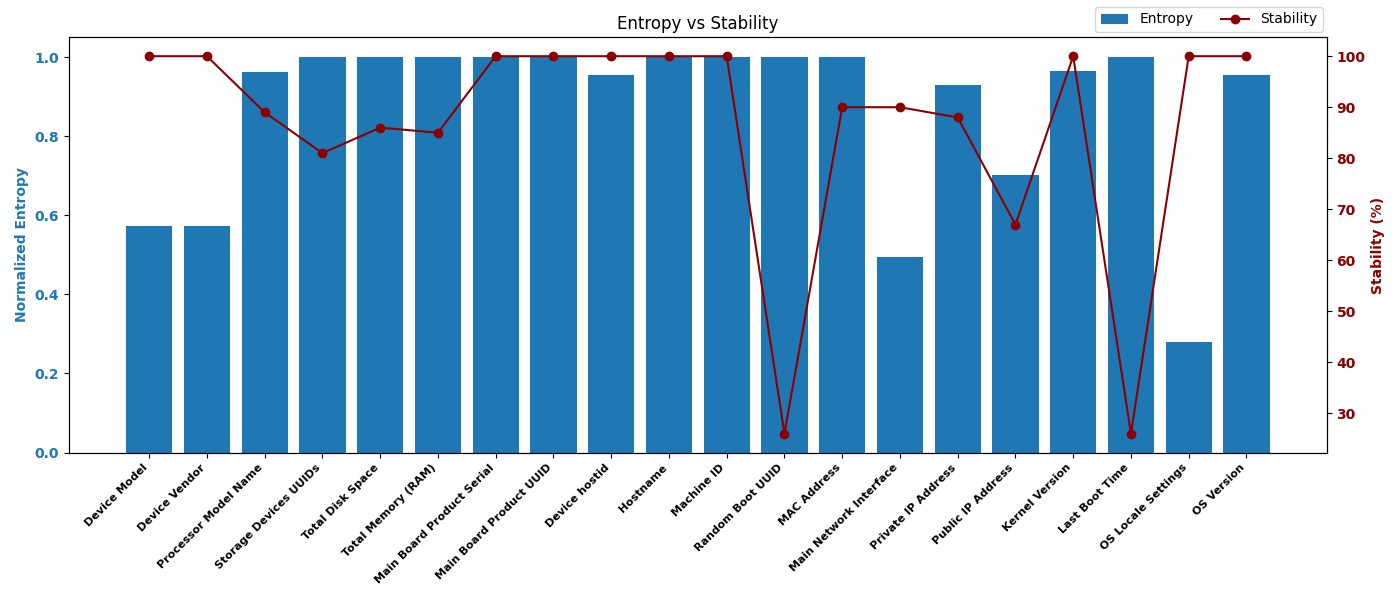
We conducted a limited evaluation to gain practical insights into the properties of these signals. We collected the signals listed in Table 2 from 20 different Linux or Linux-based systems (see Table 3) and evaluated two metrics for each signal:
| Id. | Device | OS | Kernel | Type |
|---|---|---|---|---|
| 1 | Dell XPS 15 9550 | Ubuntu 24.04.1 LTS | 6.1.0-29-amd64 | PC |
| 2 | Sony Xperia Mini Pro (SK17i) | Android 4.0.4 | 2.6.32.9-perf | Phone |
| 3 | Xiaomi Redmi Note 13 Pro 5G (MZB0FFVEU) | Android 13 | 5.10.209-00019-g4ea09a29 8bb4-510.09 | Phone |
| 4 | Samsung Galaxy S20 Plus (SM-G986B/DS) | Android 15 | 5.10.209-android12-9-00019-g4ea09a298bb4-ab12292661 | Phone |
| 5 | OnePlus Nord CE 3 Lite 5G (CPH2465) | Android 15 | 5.4.254-qgki-g62f82e1209c4 | Phone |
| 6 | Amazon Fire 7 (KFAUWI) | Fire OS 5.6.4.0 | 3.10.54+ | Tablet |
| 7 | Samsung Galaxy Tab A7 Lite (SM-T290) | Android 11 | 4.19-127-23708672 | Tablet |
| 8 | Samsung Galaxy Tab A (SM-T220) | Android 11 | 4.9.227-perf-23848788 | Tablet |
| 9 | Amazon Fire TV Stick Basic Edition 7 | Fire OS 5.2.9.5 | 3.10.54+ | IoT |
| 10 | CentOS Stream 9 (Google Cloud) | CentOS Stream 9 | 5.14.0-553.el9.aarch64 | Cloud/VPS |
| 11 | Debian 12 (Google Cloud) | Debian 12 (bookworm) | 6.1.0-29-cloud-amd64 | Cloud/VPS |
| 12 | OpenSUSE Leap 15.5 (Google Cloud) | OpenSUSE Leap 15.5 | 5.14.21-150500.55.88-default | Cloud/VPS |
| 13 | Container Optimized OS (Google Cloud) | Google COS 105 | 5.15.173+ | Cloud/VPS |
| 14 | Rocky Linux 8 (Google Cloud) | Rocky Linux 8 | 4.18.0-553.16.1.el8_10.cloud .0.1.aarch64 | Cloud/VPS |
| 15 | Ubuntu 24.04 LTS (AWS) | Ubuntu 24.04 LTS | 6.8.0-1024-aws | Cloud/VPS |
| 16 | Amazon Linux 2 (AWS) | Amazon Linux 2 | 5.10.236-228.935.amzn2. x86_64 | Cloud/VPS |
| 17 | Debian 12 (AWS) | Debian 12 (bookworm) | 6.1.0-32-cloud-amd64 | Cloud/VPS |
| 18 | Ubuntu Server 22.04 (Azure) | Ubuntu Server 22.04 LTS (jammy) | 6.8.0-1029-azure | Cloud/VPS |
| 19 | AlmaLinux 9 (Azure) | AlmaLinux 9 | 5.14.0-570.12.1.el9_6.x86_64 | Cloud/VPS |
| 20 | OpenSUSE Leap 15.5 (Azure) | SUSE Linux Enterprise 15 SP5 | 5.14.21-150500.33.75-azure | Cloud/VPS |
Figure 1 shows the entropy and stability values obtained. Even though the size and coverage of the device set is limited, the results allow us to draw some broad conclusions:
We wrote a tool named tuxid that collects as many signals as available from the catalog above and builds a system fingerprint. The collected signals depend on both their availability on the target system and the tool's execution privileges. tuxid returns a JSON object containing the value of each signal (either the raw value or its hash) and the system fingerprint, which is computed by hashing the concatenation of all signal values. For maximum portability, tuxid is implemented as a POSIX-compliant Bash script. The listing below shows an example of the output produced.
tuxid is available in this GitHub repository.
{
    "hardware_signals": {
        "Device Model": "f11c60414cc662a5f7d0b407dd29a0bf3d5f8921",
        "Device Vendor": "818ebe0169e57c3063ec51fb8f59d9975a830eb6",
        "Storage Devices UUIDs": "feaa9e56e555297bbcd3992700a70917d17e8d35",
        "Processor Model Name": "dea834292a062781b29035985070f06fd29e1b59",
        "Total Memory (RAM)": "3b8b0ad024a457334aa21a91ca346d7369513ec2",
        "Total Disk Space": "3002fad2041e803689a833c0aa7a398169591c96"
    },
    "software_signals": {
        "Machine ID": "8e08ef60699ae0817d435da246278926079967b0",
        "Device hostid": "33c2e0caab0ae39735231db1f650b9cd90f2846d",
        "Hostname": "3e3218ef3b6aa0f036c4f87cb845ee5c5b790e74",
        "Random Boot UUID": "5e6ed3ec6f3a9bb6a90f491abdaab3434bcbe561"
    },
    "network_signals": {
        "Private IP Address": "b9433b1915dc5ff9e97dec4be647fa77c6245e43",
        "Public IP Address": "fe08a4ade52de7da79ba26df9bc1ab15e35335b2",
        "MAC Address": "6fdb129968f7f653ea357ea194f6886197eb9194",
        "Main Network Interface": "94357751aa7cf66c9b939a4a6e7b63560bf0a7ce"
    },
    "os_signals": {
        "OS Locale Settings": "2f7b4e2832e68e1b002423d9459c63734eef3941",
        "Kernel Version": "4ec9d088b1f39928ceeb81cf28139ce6160dd056",
        "OS Version": "e1887bfd77d126e0f74b08598303e7e2ae1bfbd7",
        "Last Boot Time": "1eca1470a2fc8c3189cee8c2df705f64bca39b2e"
    },
    "fingerprint_hash": {
        "hash_digest": "3f5cf58f9a47e285a6573f59a154c18aee8b49cf",
        "hash_algorithm": "sha1sum"
    }
}